Preset Browser
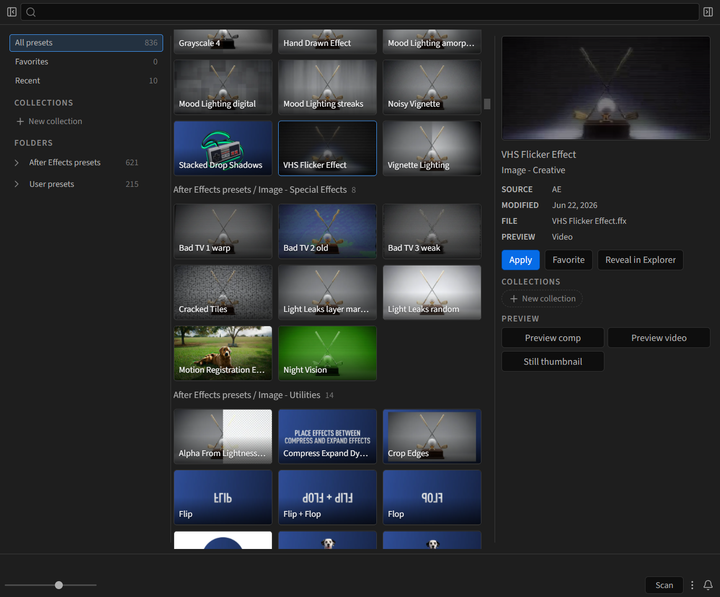
Preset Browser is a free, dockable After Effects panel that puts every animation preset already on your machine in one searchable gallery. Browse Adobe’s presets and your own, watch a preview before you commit, favorite the ones you reach for, and apply one to the selected layers with a click.
Installation Install the extension and open it in After Effects.
Quick Start Scan your presets and apply your first one.
Applying Presets Apply to selected layers, or let the panel make the layer.
Previews Make your own previews for any preset.
What Preset Browser does
Section titled “What Preset Browser does”- Finds the presets After Effects lists in Effects & Presets: Adobe’s bundled presets and your User Presets folder
- Shows a preview of Adobe’s presets out of the box, and plays it when you hover a card
- Searches every preset by name, file name, and folder
- Organizes presets into Favorites, Recent, and your own collections
- Applies a preset to the selected layers, or creates a text layer, shape layer, or solid for it when nothing is selected
- Makes previews of any preset, including your own, from a preview comp it builds for you
Preset Browser never ships or copies Adobe’s preset files. It reads the ones already installed with your After Effects.
Requirements
Section titled “Requirements”Preset Browser is free and works in After Effects 2024 and newer, on Windows and macOS. Get it at jakeinmotion.com/preset-browser.