Ease Buttons
An ease button stamps a stored ease onto your selected keyframes. Build a curve once, then apply it anywhere with one click.
Use one
Section titled “Use one”- Select the keyframes to ease — across several properties and layers at once, if you like.
- Click the button.
A two-point ease works on any selection, even a single keyframe — the curve’s two ends set that key’s outgoing and incoming ease. That includes a keyframe with no others on its property, exactly like pressing Easy Ease on one: the ease sits on the keyframe, ready for the moment a second one arrives. A multi-point ease needs two selected keyframes to build between.
Each click is one undo step, and the result tells you what was applied, created, or skipped.
There are two kinds of ease:
- A two-point ease shapes the curve between your keyframes — a classic ease-in/ease-out, as precise as you want it.
- A multi-point ease is a whole shape — a bounce, an overshoot-and-settle, an oscillation. It creates its own keyframes between the two you selected.
The ease graph
Section titled “The ease graph”An ease button’s editor opens a curve graph with value and speed views. It takes the same keys After Effects’ own graph editor does:
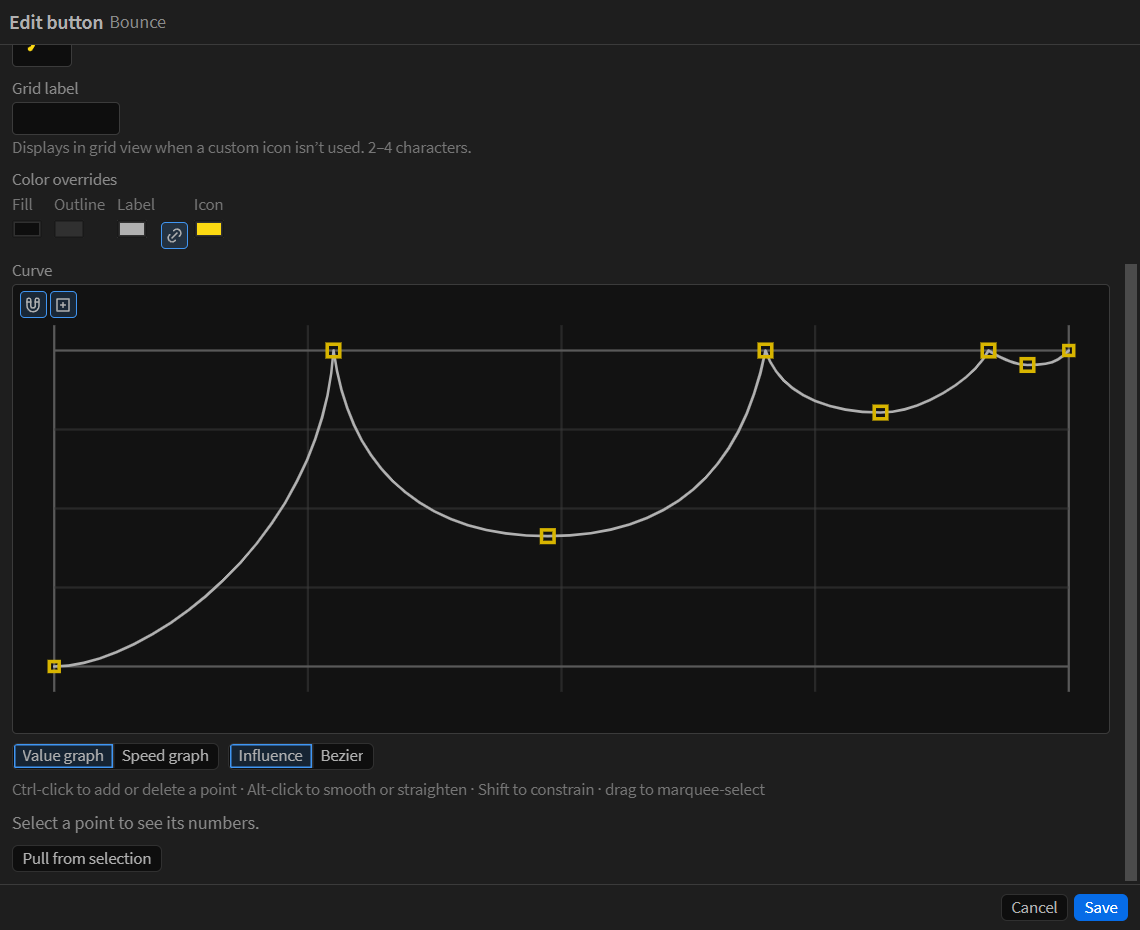
- Ctrl-click the curve to add a point, or a point to delete it. Hold Ctrl while dragging to flip the snapping magnet the other way.
- Alt-click a point to smooth it, and again to straighten it. Alt-drag a handle to break the pair apart or rejoin it, or Alt-drag the point to pull a mirrored pair out of it.
- Shift locks a drag to one axis, flattens a handle, and adds to the selection when you Shift-click.
- Drag empty space to marquee-select. Two or more points get a transform box: drag inside it to move them, a grip to scale about the opposite side, or hold Ctrl on a grip to scale about the anchor.
- Delete removes the selected points. Escape clears the selection.
On macOS, use Cmd where Windows uses Ctrl.
Pull an ease from keyframes
Section titled “Pull an ease from keyframes”Pull from selection in the editor reads the ease your selected keyframes already have into the graph — the fastest way to turn an ease you built by hand into a reusable button.
Snapping to whole frames
Section titled “Snapping to whole frames”A multi-point ease’s created keyframes land on whole frames by default. Turn this off under Menu > Settings > Easing if you want them placed exactly along the curve instead.
What can’t be eased
Section titled “What can’t be eased”Properties that only hold values — Source Text, checkboxes, menus — do not support easing, and Code Runner names them instead of guessing. Mask and shape paths can be stamped, as long as every keyframe has the same number of points; pulling an ease from a path is not supported.